

Introduction
ACTION GAME MAKER G version 2.0 is finally here as an official release!
Since the beta launched in September, your bug reports and feature requests have helped us polish this release considerably.
We would like to extend our heartfelt thanks to all of our beta testers.
With this major update, we have also renamed the product from "ACTION GAME MAKER" to "ACTION GAME MAKER G."
(In Japan, the product is now titled "Action Game Tsukuru G," joining the "Tsukuru" family name shared with the RPG Maker series.) We will continue to work hard on updates so that the tool lives up to that name.
*Only the name has changed. There are no changes to licensing, pricing, or anything else.
Highlights of This Update
This update introduces "Maker Mode," an all-new mode rebuilt from the ground up with intuitive UI/UX as its goal.
Maker Mode is a UI where the entire screen changes depending on the task at hand, much like the RPG Maker series. Choose "Map Editing," "Object Editing," "Screen Transitions," or "Assets" from the tabs at the top, and only the lists and settings needed for that task are shown, so you see only what you want to make right now. No more hunting for where things are: just start with what you want to create. You can still switch back to the classic UI, and you can even use Maker Mode's new features from within the classic UI.
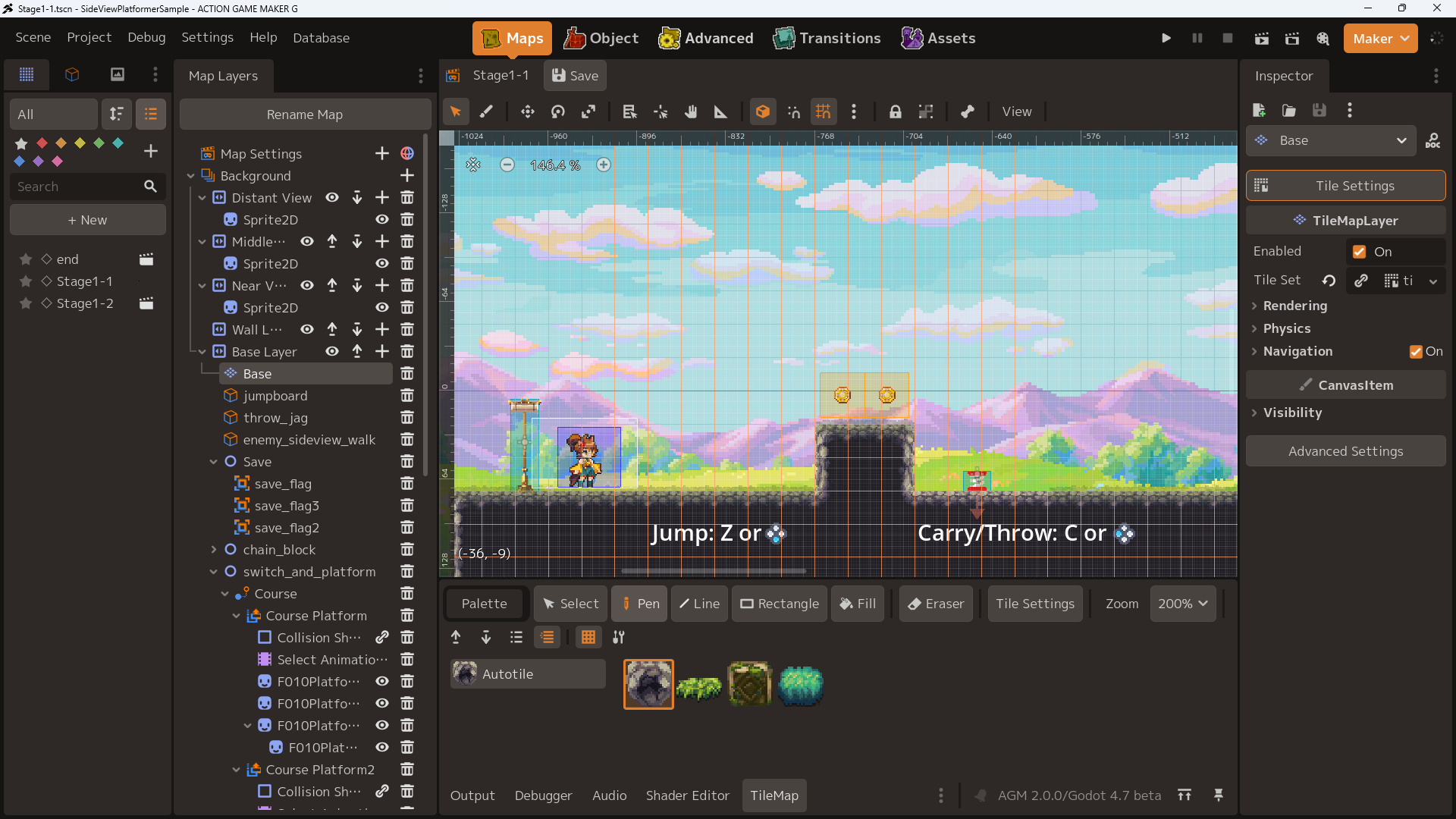
We have also added a variety of features to support your game development, including the "Setup Wizard," which guides you through initial setup; the "Interactive Screen Tutorial," which teaches you how to use the editor while operating the actual screen; the "Tile Palette," which lets you manage imported tiles in one place and use them across many scenes, just like RPG Maker; a dedicated "Sprite Animation" feature that lets you create animations as in our previous title, Pixel Game Maker MV; and the "AGM Debug Monitor," which shows detailed parameters of your running game and lets you change them on the spot.
We have also added 23 new actions and conditions and 14 new nodes, including actions for grabbing and throwing objects, actions for clinging to walls and hanging from ledges, and the Gimmick Object node, which lets you place large numbers of breakable blocks.
We hope you enjoy the reborn UI, the new creation experience, and the expanded set of features.
⚠ Caution: This is the largest update in ACTION GAME MAKER history
We have taken every possible measure to minimize the impact on existing projects. However, given the size and scope of this update, problems may well occur.
Please be sure to back up your projects before using this version.
In addition, the following changes will definitely affect existing projects.
⚠ Changes That Affect Existing Projects ⚠
A platform's velocity can now be added when jumping off a platform
This uses a built-in Godot feature and is enabled by default, so the behavior clearly differs from versions prior to 2.0.
You can restore the previous behavior by changing the GameObject node property "CharacterBody2D > Moving Platform > On Leave" dropdown from Add Velocity to Do Nothing.
Changed the behavior of "Adjusted Jump"
Adjusted Jump can now be used by enabling it in a state, even if Adjusted Jump or the jump key is not set in "MoveAndJumpSetting." If no Adjusted Jump key is set, the key of the most recent input transition is automatically used as the Adjusted Jump key.
Fixed a bug where Adjusted Jump was cut off when the state changed during an Adjusted Jump.
Because of these two changes, Adjusted Jump will now work correctly in states where "Adjusted Jump was enabled but did not work because no Adjusted Jump key was set," and in states where "Adjusted Jump was enabled but the state changed immediately, ending the effect partway through." As a result, behavior may differ from before.
These items require manual changes. We apologize for the inconvenience and appreciate your understanding.
Update Details
Completely Redesigned UI
You can now choose "Maker Mode," a completely redesigned new UI.
The original UI remains available as "Godot Mode." Maker Mode's new features can also be used in Godot Mode.
New Usability Features
New tutorial introducing the screen layout
An interactive tutorial integrated into the editor, available from the Tutorials section of the launcher.
New dedicated animation features
Added "Sprite Animation," which makes it easy to import sprite animations.
Added "Collision Animation," which lets you set collisions to match each frame of a sprite animation.
Added a feature that automatically creates animation sets from sprite sheets made to match Pixel Game Maker MV / RPG Maker templates.
New docks listing game scenes and objects
Matching files in your project are listed automatically. You can also add labels and mark favorites.
New system for importing official assets, official DLC, and official systems
As of 2.0.0, the available official system is a save / pause / load menu system.
Reference search for variables and switches
Find where variables and switches are used, available from the Variable / Switch Settings window and the Database. A feature to rename them based on the search results has also been added.
Added a collision compatibility check
Visually check what happens when Object A and Object B touch, whether A's attacks hit B, and more.
Added "Environment Presets" for easily setting up a scene's environment
Apply environments such as a sunset, a snowy landscape, or a mystical forest with a single button. The color tone, shaders, and more of the placed tiles and objects are adjusted automatically.
Added the "AGM Debugger" for debugging while you play
Test-play while watching each value, and change values on the spot.
Added features that make it easier to work with AI
Visual scripts can now be exported / imported in a text format that AI can read, and you can output a catalog for AI.
Many other improvements
Previews for portals, previews for showing effects and particles, a reorganized Inspector, and more.
New Features That Expand Your Games
A dedicated loading system
Besides faster loading, you can now set up loading scenes, and an object pooling feature that creates objects in advance has been added.
Top-down view support
New node: Top-Down Water Surface
Extended: The "Template Movement" action can now use top-down pathfinding.
Extended: Import of RPG Maker-format autotiles
Extended: Import of RPG Maker-format character sprites
Extended: You can now choose the project type from "Side View" or "Top-Down View." The available templates and some settings change depending on your choice.
Mouse / touch / analog stick support
New action: Assign Mouse Info to Variable
New action: Assign Stick Input to Variable
New condition: Mouse Input
Extended: Stick movement added to Move and Jump Settings
Extended: Bullet data can now fire bullets toward the mouse or stick direction
Actions involving velocity and momentum
New action: Set Object Velocity
Set a target and a velocity to give it momentum. You can knock it away, launch it, make it jump, and more.
New custom node: Force Area
Create conveyor belts, strong wind zones that push you back, water currents, tractor beams that pull at a constant speed, and more.
Pick up and throw placed objects
New action: Pick Up Object
New action: Put Down / Throw Held Object
Added an action for easily setting up knockback
New action: Knock Back Self
Added an action for changing an object's angle
New action: Change Object Angle
Added ladder actions
New action: Grab Ladder
New condition: Overlapping Ladder Tile
Extended: Tiles can now be given a ladder attribute.
Added an action for moving the camera
New action: Move Current Camera
Autosave and Quick Restart
New action: Quick Restart
Return to an autosave point, return to the last foothold you touched, and more. It's fast because no scene load is involved, and the BGM keeps playing.
Extended: "Save Game Data" can now specify an autosave slot
Shared Board
New action: Set Shared Board Value
New action: Find Object and Record to Shared Board
New condition: Check Shared Board Value
Extended: Objects on the Shared Board can now be used as targets for some actions and for "Fire Bullet"
Compared with the existing Lock actions, the Shared Board can record objects more flexibly, change their properties, and store values that variables cannot hold, such as strings.
Lightweight objects designed for placing and spawning in large numbers
New action: Generate Score Drops
New custom node: Gimmick Object
Gimmick Objects cover things like breakable walls and coins, equivalent to the Gimmick Tiles in our previous title.
Score Drops are like a bullet hell, but for items. You can scatter lots of experience orbs and more.
New node for building moving platforms
New custom node: Course Platform
Moves along a course, and its start conditions can be set with simple conditional branches.
Added Effects Over Time, making it easier to create "Poison," "Regen," "Buffs / Debuffs," and more
New action: Start Effect Over Time
New action: Change Effect Over Time
New action: Clear Effect Over Time
New condition: Effect Over Time Is Active
You can create effects such as "Take damage equal to 1/8 of max HP once per second for 5 seconds. This effect stacks up to 3 times."
Revamped text features
You can now show variables within text and use images from the Database as emoji.
New custom node: ValueLabel
New custom node: ValueRichLabel
Extended: "Show Text" now supports showing variables within text and BBCode.
Expanded damage system
New action: Deal Damage
Extended: Damage display settings can now configure the color for healing, and more
For more details on the new features, please see the manual on RPG MAKER GUILD.
https://guild.rpgmakerofficial.com/t/topic/2979
Changed files in this update